• 営業:
    +1(279) 499-2767 (米国)
  •  または 
    +44(800) 0584677 (ヨーロッパ)
Companyログイン
anychart logo
qlik logo
デモ
ニュース
ミーティングを予約
今すぐ購入
無料体験
anychart logo
Qlik partner AnyChart

北米本社

AnyChart, P.O. Box 840180, St. Augustine, FL 32080, USA

営業担当

+1(279) 499-2767 (米国)
+44(800) 0584677 (ヨーロッパ)
sales@anychart.com

フォローする

サポート:

support@anychart.com
プライバシーポリシー
© 2026 AnyChart.Com 無断転載禁止。

サーキュラーゲージ

OverviewDocumentationDemosRoadmapVersion History

Bug fixes:

QLIK-778:

  • Extension first load issue fixed
  • Elements not showing in the definition panel issue fixed
  • Expression color application issue fixed
  • Incorrect color application for some chart types fixed
  • Incorrect color application for stacked charts fixed

General Styling Customization

Introducing an array of general styling options to customize your Circular Gauge visualizations in our Qlik Sense extensions. These improvements encompass background color and background image, as well as title, subtitle, and footnote texts, enabling you to easily align your data presentation with your design vision.

Access and configure these settings within the properties panel, specifically under the Styling > General section. Here, you can select font styles, color schemes, and more to tailor your visuals to your preferences.

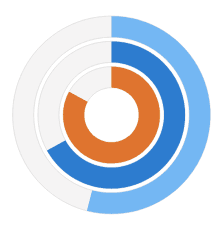
Versatile Circular Gauge

Versatile Circular Gauge

Gain freedom in effectively visualizing your KPIs using our Circular Gauge extension for Qlik Sense! With new options for viewing your KPIs, you'll find our gauges to be flexible beyond the standard ones in use today.

Highlights:
  • New selection of shapes and sizes provides you with more options
  • Multiple pointers/reference ranges show more info in a smaller space
  • Support for custom images allows you more branding options

See the Circular Gauge Features demo app for Qlik Sense.