

Medidor circular
Personalización general de estilo
Presentamos una serie de opciones generales de estilo para personalizar sus visualizaciones de Circular Gauge en nuestras extensiones de Qlik Sense. Estas mejoras incluyen el color e imagen de fondo, así como los textos de título, subtítulo y pie de página, lo que le permite alinear fácilmente la presentación de sus datos con su visión de diseño.
Acceda a estos ajustes y configúrelos en el panel de propiedades, específicamente en la sección Estilo > General. Aquí podrá seleccionar estilos de fuente, esquemas de color y más para adaptar sus visualizaciones a sus preferencias.
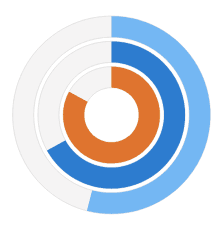
Circular Gauge versátil
Gain freedom in effectively visualizing your KPIs using our Circular Gauge extension for Qlik Sense! With new options for viewing your KPIs, you'll find our gauges to be flexible beyond the standard ones in use today.
Highlights:
- New selection of shapes and sizes provides you with more options
- Multiple pointers/reference ranges show more info in a smaller space
- Support for custom images allows you more branding options
See the Circular Gauge Features demo app for Qlik Sense.