

Gantt Project
Customizable Data Loading
Introducing an advanced level of data loading control within Gantt charts, applicable to both Project and Resource visualizations. You can now adjust the row retrieval behavior by defining the data chunk size, achieving an optimal balance between loading speed and seamless scrolling tailored to a specific scenario and your individual preferences.
The default chunk size fetches 50 rows per request, ensuring a harmonious performance. Customize this setting in Add-Ons > Data Handling > Data Chunk, allowing you to select any value between 1 (incremental row-by-row loading) and 10000 (comprehensive initial rendering).
Gantt: Smart Data Loading
Revamped data handling so that data now loads partially and only when it's needed. This results in faster load times and a more responsive user interface. We've also added a "Loading data" message so you know what's going on while you wait.
Gantt: Faster Chart Rendering
We've overhauled the rendering mechanism to ensure that chart rendering speed is no longer affected by a large volume of data. You'll notice a dramatic increase in drawing speed!
Gantt: Optimized Expression Performance
We've resolved an issue related to expressions that previously caused unnecessary redraws, which used to slow everything down. With this improvement, expressions are optimized for better performance, and you can manipulate data faster and more efficiently.
Gantt: Enhanced Printing Capabilities
We've fixed a bug that caused missing labels on Gantt charts when printing through the toolbar. So now you can print your Gantt charts accurately without any issues.
Bug fixes:
- Minor bug fixes and improvements
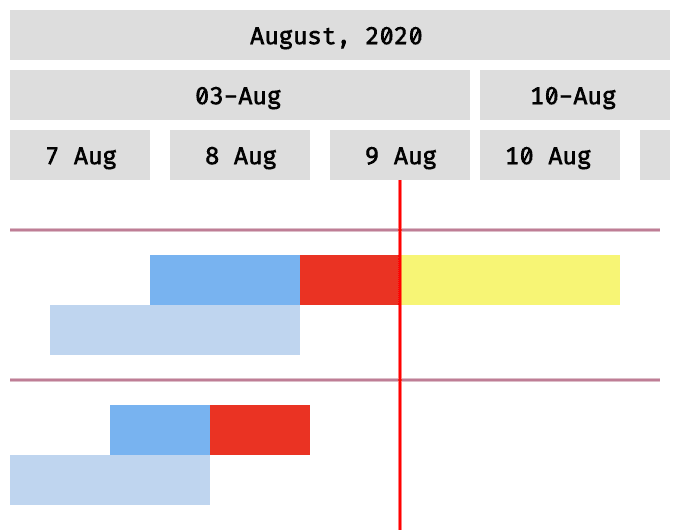
Baseline-Dependent Coloring of Actual Bars
The actual bars can now be automatically colored depending on the current status compared to the baseline plan. It will let you view the variances between the present and original schedules at a glance.
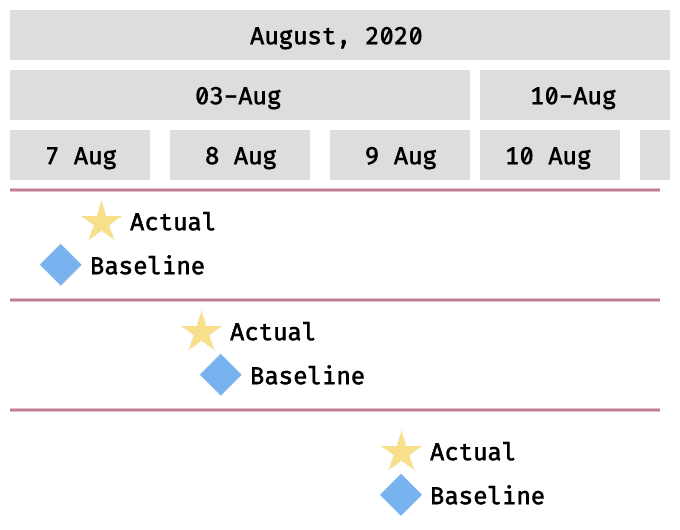
Baseline Milestones
Now you can put milestones on not only actual but also baseline elements. So you will be able to schedule important events and evaluate progress through the respective milestones with ease.
Improvements:
- QLIK-363 — Milestones preview centered in a row.
- QLIK-454 — Baseline bars can be shown above actual bars.
- QLIK-455 — Collapse/expand buttons are configurable now.
- QLIK-458 — Dimension column rows HTML support.
- QLIK-459 — Performance improvements.
Bug fixes:
QLIK-460 — AnyGantt conversion issue fixed.QLIK-515 — AnyGantt sorting issues fixes.QLIK-656 — AnyGantt Resource labels issues fixed.
Improvements:
- QLIK-361 — Unbalanced tree option added providing more flexibility with hierarchical data.
- QLIK-364 — Preview milestones can now be shown only on collapsed grouping tasks.
Bug fixes:
- QLIK-312 — Gantt milestones issue, empty tooltip issue fixed.
- QLIK-314 — Resource milestones labels issue fixed.
- QLIK-318 — Extension conversion issue fixed.
- QLIK-336 — Unnecessary custom tooltip title on table issue fixed.
- QLIK-362 — Tooltip issue fixed.
- QLIK-365 — Resource milestones elements position issue fixed
- QLIK-366 — Show total with fully expanded mode issue fixed
- QLIK-416 — Gantt legend control issue fixed
- QLIK-419 — Gantt redraw issue when filter pane in fullscreen mode fixed
New Features:
- QLIK-881 — Added week labels dropdown with multiple display formats: week start date, week number (1–53), and week-of-month (1–5).
- QLIK-897 — Added week cycle settings:
weeksEndWithYearandweeksCycleMonthlyoptions with adaptive label formatters. - QLIK-897 — Added configurable fiscal year offset (start month).
Bug Fixes:
- QLIK-888 — Fixed unbalanced tree rendering issue (verified with 6,800+ tasks).
Improvements:
- Migrated to unified About panel with updated branding and license display.